
Power Platform buyer’s guide
How to Choose the Right Power Automate Consulting Services
Know what a consultant should deliver and how the finished workflow will be owned after launch.
Power Automate consulting services should help you choose the right process, design the workflow, connect the required systems, test failure paths, and leave your team with clear ownership and support instructions. Power Automate development consulting and implementation services are most useful when they leave behind a workflow people can operate and troubleshoot.
A consultant is most useful when a workflow crosses teams or systems, handles sensitive data, needs premium connectors, or has consequences when it fails. A small, low-risk approval or reminder may be reasonable to build internally. Look at the risk, exceptions, data access, and support owner before worrying about the number of steps.
What should Power Automate consulting cover?
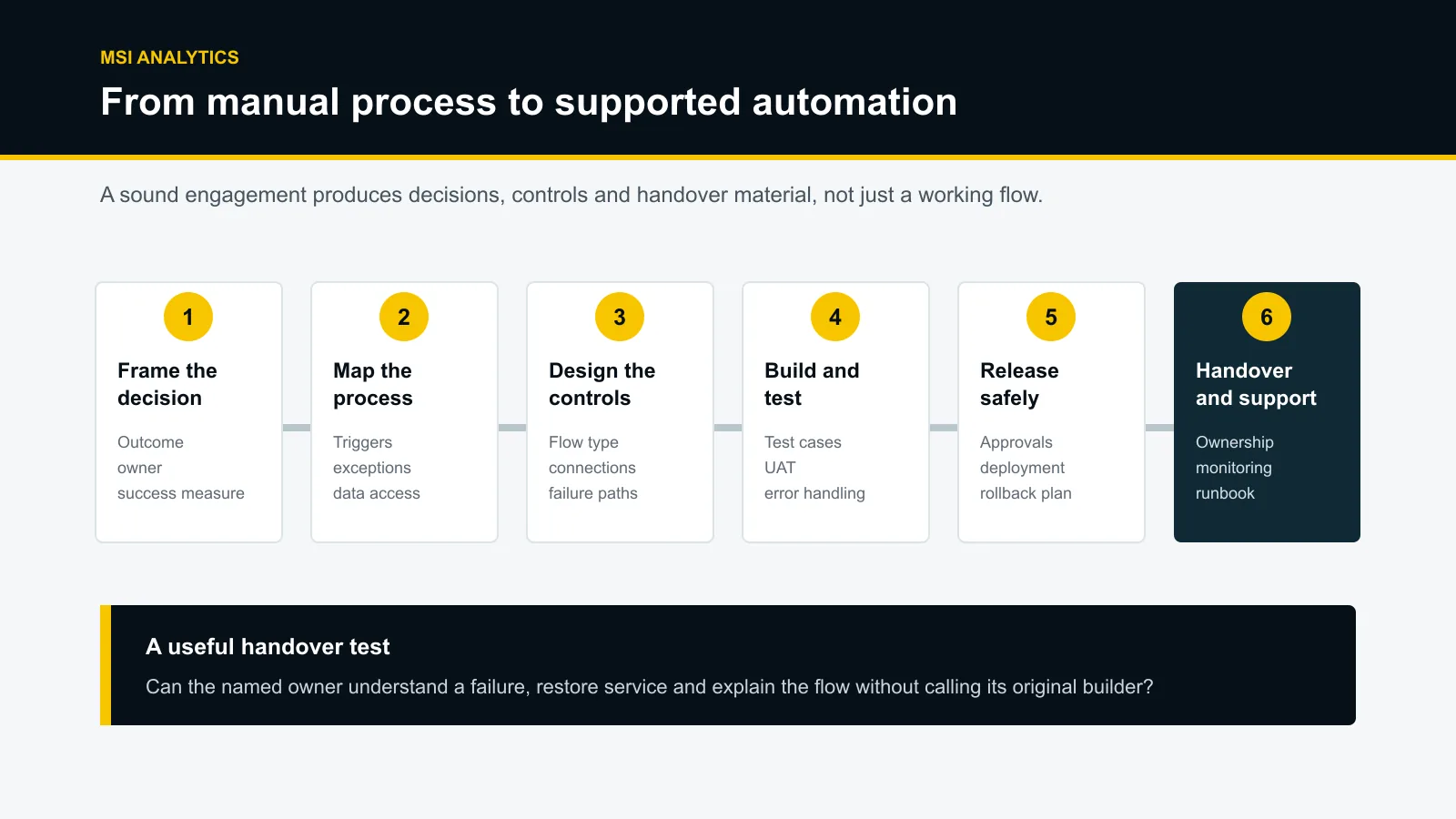
The work should begin with the business process before anyone opens the designer canvas. The first questions concern the decision or action the workflow supports, the people involved, the systems that hold the data, and the cost of delay or failure.
Microsoft describes Power Automate as a service for creating automated workflows between applications and services. Those workflows can include cloud flows and desktop flows, but choosing a flow type is a design decision, not the discovery process. A consultant should first establish whether automation is appropriate at all.
Process assessment
Map the current steps, delays, decisions, exceptions, owners, volumes, and evidence requirements. This often reveals that part of the process needs simplifying before it is automated.
Solution design
Choose the trigger, actions, flow type, connection model, environment, data policy constraints, error paths, and deployment approach.
Build and validation
Develop the flow, test normal and exceptional cases, confirm permissions, and run user acceptance testing with the people responsible for the process.
Release and handover
Move the approved solution into production, document dependencies, assign ownership, set up monitoring, and show the internal team how to investigate failures.
The proposal should name the outputs for each stage. Phrases such as “implementation” or “ongoing support” are too broad on their own. Ask what documents, test evidence, training, monitoring, and support boundaries are included.
When is a Power Automate consultant worth it?
Low-code tools can still support processes with serious consequences. A flow that sends a reminder to one person is different from a workflow that updates financial records, routes customer requests, or controls an approval. Those higher-risk workflows need more thought about access, recovery, and accountability.
Consulting is worth considering when several of these conditions apply:
- The process crosses departments, tenants, or business systems.
- Premium connectors, custom APIs, gateways, or desktop automation may be required.
- A failed or duplicated action could create a financial, customer, operational, or compliance problem.
- The workflow has many exceptions that staff currently resolve through judgement.
- The organisation needs separate development, test, and production environments.
- No internal person can own connections, monitor runs, and maintain the flow.
- The automation must feed reporting or create an auditable record of what happened.
An internal build can make sense when the process is stable, the data is already accessible, the effect of failure is small, and a named employee can support it. Even then, document the owner and recovery steps before the flow becomes part of daily work.
Score the process before you automate it
A promising automation candidate is repetitive and rule-based, with known inputs and manageable exceptions. Volume alone is not enough. A task completed ten times a day may still be a poor candidate if every case needs interpretation.
| Question | Good signal | Warning sign |
|---|---|---|
| Is the process stable? | The steps and decision rules are agreed. | Teams follow different versions of the process. |
| Are the inputs usable? | Required fields are structured and consistently populated. | Important details live in free text, email threads, or missing fields. |
| Can exceptions be described? | Common exceptions have owners and response rules. | Staff rely on unwritten judgement for most cases. |
| Is access available? | System owners have approved the required connectors and permissions. | Access, licensing, or API limits are unknown. |
| Is failure recoverable? | The team can detect, retry, reverse, or manually complete a failed action. | A silent failure could remain unnoticed or corrupt records. |
| Is there an owner? | A named business and technical owner will support the workflow. | The flow will remain under a consultant’s or departing employee’s account. |
If several warning signs appear, the first engagement may need to focus on process and data design rather than development. Automating an unsettled process tends to preserve its confusion.
Common Power Automate consulting engagements
Define the engagement around a business outcome and clear boundaries. The following project shapes are useful starting points:
Approvals and task routing
A request enters through a form, list, application, or business event. The workflow checks required fields, routes it to the right person, records the decision, handles time-outs, and reports overdue work. The difficult part is usually the exception and escalation policy.
Notifications and operational follow-up
A system change creates a Teams or email alert, assigns a task, or starts a follow-up sequence. The consultant should define how duplicate alerts are prevented, what happens after a failed delivery, and which events deserve a notification.
Data movement between systems
A workflow creates or updates records across Microsoft 365, Dataverse, line-of-business applications, or APIs. This work needs clear rules for matching records, preventing duplicates, handling partial updates, and reconciling failures.
Document and file processes
A flow may name, move, approve, archive, or route documents. Retention, permissions, versioning, and duplicate-file behaviour should be agreed before development.
Flow repair and production hardening
Existing flows may have broken connections, unreliable triggers, hidden dependencies, or weak error handling. A repair engagement should produce an inventory, root-cause findings, revised design, regression tests, and a support runbook.
Desktop flows can automate work across modern and legacy applications through robotic process automation. Microsoft explains that they can interact with applications that do not expose suitable APIs. That capability can be useful, but it introduces machine, session, credential, and unattended-run considerations. Confirm that a provider has relevant desktop-flow experience before putting it in scope. See Microsoft’s desktop flow overview.
Connect reporting to action
Power BI explains what is happening. Power Automate can help route the next step. The combination is useful when a report reveals an exception but the business still relies on someone to notice it, copy details into another system, and chase an owner.
A workable pattern starts with a defined business event. The flow validates the event, performs or assigns an action, records its status, and exposes enough data for Power BI to report completed, failed, overdue, and unresolved items. Reporting then covers the process itself, not just its input data.
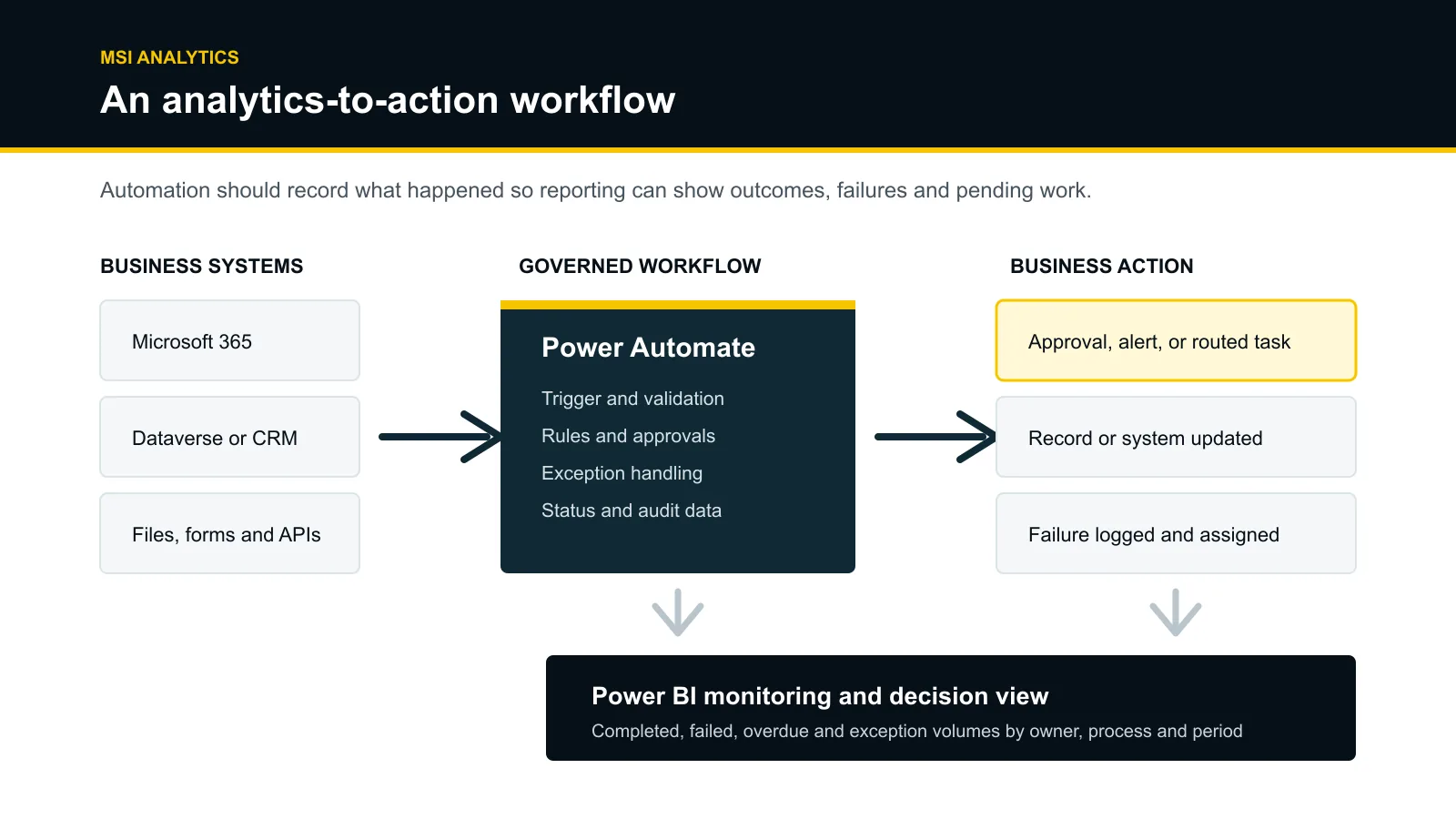
MSI Analytics works across Power BI and the wider Power Platform, including Power Automate. Its published focus includes integrating data sources, automating reports, and building decision-ready dashboards. That makes MSI a relevant fit when the workflow sits beside reporting, data integration, or a Power BI solution. You can review the dashboard showcase and MSI’s published Power Platform experience before discussing scope.
A practical delivery process
A proposal is easier to compare when every phase has a decision, an output, and an owner. The sequence below is not the only valid approach, but it exposes gaps that a feature list can hide.
| Phase | Questions to settle | Expected client output |
|---|---|---|
| Discovery | What decision or action is being improved? Who owns it? What can go wrong? | Process map, scope, success measures, assumptions, risks, and named owners. |
| Prioritisation | Is automation suitable? Which version creates useful value with acceptable risk? | Candidate score, recommended release scope, exclusions, and dependency list. |
| Design | Which flow type, systems, connections, environments, policies, and error paths are needed? | Solution design, connection model, licensing inputs, test approach, and release plan. |
| Build and test | Does the flow handle normal, boundary, duplicate, unavailable-system, and permission cases? | Configured solution, test evidence, issue log, and user acceptance sign-off. |
| Release | Who approves production? How is the release reversed if something fails? | Deployment record, production checks, rollback steps, and initial monitoring. |
| Handover | Who owns the flow, connections, alerts, documentation, and future changes? | Inventory, runbook, owner list, support boundaries, and training material. |
Microsoft’s application lifecycle management guidance covers solutions, source control, environments, testing, and deployment as connected parts of delivery. Even a modest project benefits from treating production changes as controlled releases rather than edits made directly in a live flow.
What production-ready should mean
A flow can pass a demonstration and still be difficult to operate. Production readiness is about ownership, controls, and recovery when a connector, permission, source system, or business rule changes.
Handover checklist
- Each flow has a business owner, technical owner, purpose, trigger, and dependency list.
- Connections use an agreed ownership model rather than an unmanaged personal account.
- Development, testing, and production changes follow the organisation’s environment and release policy.
- Data policies permit the planned connector combinations. Microsoft uses these policies to classify connectors and control how business data can be shared.
- Failure paths cover time-outs, throttling, unavailable systems, invalid data, duplicate events, and permission changes.
- Alerts identify the flow, failed step, affected item, owner, and next action.
- The runbook explains how to pause, retry, reconcile, roll back, and escalate.
- A review date is set for connections, owners, licences, business rules, and unused flows.
Microsoft recommends robust error handling through run-after settings, retry policies, scopes, termination states, logging, and notifications. It also documents platform and connector limits that can affect throughput and retries. These details belong in design and testing, particularly when a workflow processes large volumes or depends on an external API. See Microsoft’s guidance on error handling, flow limits, and data policies.
How to choose a Power Automate consultant
When evaluating a Microsoft Power Automate consultant, ask how the solution will behave after the original builder has left the project. A polished demonstration cannot answer that on its own.
| Evaluation area | Ask for | Be cautious when |
|---|---|---|
| Relevant experience | Work involving the same flow type, systems, risk level, and operating model. | The evidence is limited to logos, unrelated projects, or broad Power Platform claims. |
| Discovery | Questions about outcomes, process variation, ownership, exceptions, and data quality. | The provider quotes from a short list of desired actions without examining the process. |
| Architecture | A clear explanation of environments, connections, permissions, dependencies, and release method. | The design depends on one person’s account or direct edits in production. |
| Quality | Test cases, user acceptance criteria, failure handling, and deployment checks. | Testing means only running the happy path in a demonstration. |
| Commercial clarity | Scope, assumptions, exclusions, client responsibilities, licence inputs, change control, and support boundaries. | The proposal promises a result without identifying dependencies or out-of-scope work. |
| Handover | Documentation, inventory, runbook, training, ownership transfer, and a defined support period. | The client cannot maintain or even inspect the solution without the original consultant. |
Ask each shortlisted provider to walk through one failure scenario. For example: a connector is throttled after half the records have been updated. What stops, what retries, what gets logged, who is alerted, and how are the remaining records reconciled? The answer reveals more than a list of platform badges.
What affects Power Automate consulting cost and timeline?
A responsible estimate depends on the process and its operating conditions. The number of screens or flow actions is only one input. Discovery effort, system access, connector type, data quality, exception volume, desktop automation, security review, environment setup, testing, documentation, training, and post-release support can all change the work involved.
Software licensing is separate from consulting fees. Microsoft’s current plans distinguish cloud flows, attended desktop flows, unattended automation, connectors, and capacity. Prices and entitlements can vary by country and agreement, so check the current Microsoft pricing page and licensing guide during solution design rather than relying on an old article or proposal template.
For a useful estimate, provide a process map or recorded walkthrough, approximate volumes, systems involved, example inputs and outputs, exception cases, access constraints, security requirements, and the people who will test and approve the result.
What to include in your project brief
A short brief gives consultants enough context to challenge the requirement and quote the right work. It does not need to prescribe every Power Automate action.
- The business problem and the decision, action, or delay you want to improve.
- The current steps, owners, frequency, volumes, busy periods, and known exceptions.
- The systems, files, forms, inboxes, APIs, and reports involved.
- Examples of a normal case, a failed case, and a case that needs human judgement.
- The data that is sensitive, regulated, or restricted.
- The required audit trail, approvals, notifications, and reporting.
- Your current Power Platform environments, licences, administrators, and internal support capacity.
- The acceptance criteria, target date, and people available for testing.
If reporting is part of the outcome, include the measures that should show whether the workflow is working. A useful dashboard might track completed, failed, overdue, retried, and manually resolved items by process and owner. MSI’s Power BI KPI dashboard examples show ways to structure decision-focused reporting.
Frequently asked questions
What do Power Automate consulting services include?
Scope varies, but a complete engagement may include process assessment, solution design, workflow configuration, integration, testing, deployment, documentation, training, and an agreed support period. The proposal should state the deliverable and owner for each phase.
Can our team build the flow without a consultant?
Yes, when the process is stable, low risk, supported by available connectors, and owned by someone who can test and maintain it. Outside help becomes more useful as integration complexity, business impact, governance needs, or exception handling increase.
Is Microsoft Flow the same as Power Automate?
Microsoft Flow was renamed Power Automate in 2019. Someone searching for a Microsoft Flow consultant is usually looking for the same product, although current proposals and documentation should use the Power Automate name.
Does Microsoft 365 include everything needed for Power Automate?
No single answer fits every workflow. Some Microsoft 365 licences include limited Power Automate rights for standard connectors, while premium connectors, attended desktop flows, unattended automation, and other capabilities can require separate licensing. Confirm the planned users, connectors, flow type, and run model against Microsoft’s current licensing guidance.
Should a consultant own the production flow?
The organisation should agree an ownership model that survives staff and vendor changes. Avoid leaving a critical flow dependent on an unmanaged personal account. The handover should name the business owner, technical owner, connections, service accounts where approved, monitoring recipients, and recovery steps.
How do we compare two Power Automate proposals?
Compare the assumptions, exclusions, deliverables, client responsibilities, licensing inputs, test coverage, deployment method, documentation, ownership, support boundaries, and relevant project evidence. A cheaper build can cost more to operate if these items are missing.
Discuss the workflow behind your reporting
If a manual approval, alert, data handoff, or follow-up process sits between your systems and Power BI reporting, describe the current steps, failure points, and decision you need to support. MSI Analytics can use the initial conversation to establish whether the requirement fits its Power Platform and analytics work.