
Power BI licensing guide
Power BI Pro cost and license guide for choosing the right plan
Compare Power BI Pro, Free, Premium Per User, and Fabric capacity so your team pays for the collaboration it actually needs.
Power BI Pro is the paid per-user licence most teams need once reports move beyond one person’s desktop. Microsoft lists Power BI Pro at $14 per user per month, paid yearly, and positions it around publishing, sharing, workspace collaboration, report subscriptions, and access to reports shared by other Pro users. That makes Power BI Pro license cost a useful starting point, but the right plan still depends on who creates, shares, and views the reports. If you want to see how teams usually use those licences in practice, these Power BI KPI dashboard examples show the kinds of shared reporting setups Pro is normally supporting.
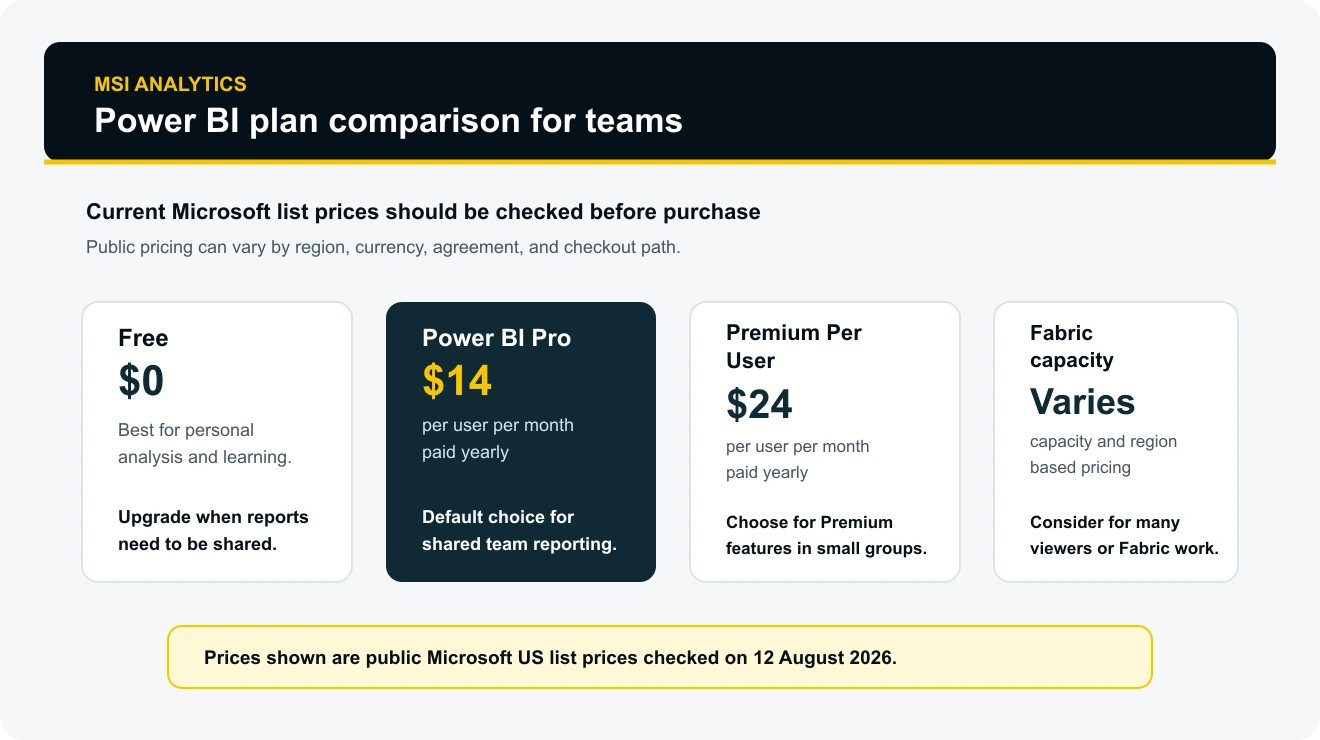
Current Power BI Pro cost
Microsoft’s public Power BI pricing page lists Power BI Pro at $14.00 per user per month, paid yearly. The same page lists Power BI Premium Per User at $24.00 per user per month, paid yearly, and the free account at $0.
Those figures should be treated as public list prices, not a final procurement quote. Microsoft states that prices can vary because of currency, country, regional factors, enterprise agreements, academic pricing, government pricing, nonprofit pricing, and checkout conditions. If the exact invoice matters, check the Microsoft 365 admin centre, your reseller, or Microsoft’s checkout page before buying.
The simplest way to estimate Power BI Pro licence cost is to multiply the number of people who need to create, publish, share, or view shared Pro-workspace content by the monthly per-user price, then convert it into an annual cost. A team with 10 Pro users at the public US list price would plan around $140 per month before taxes, regional differences, discounts, or any additional services.
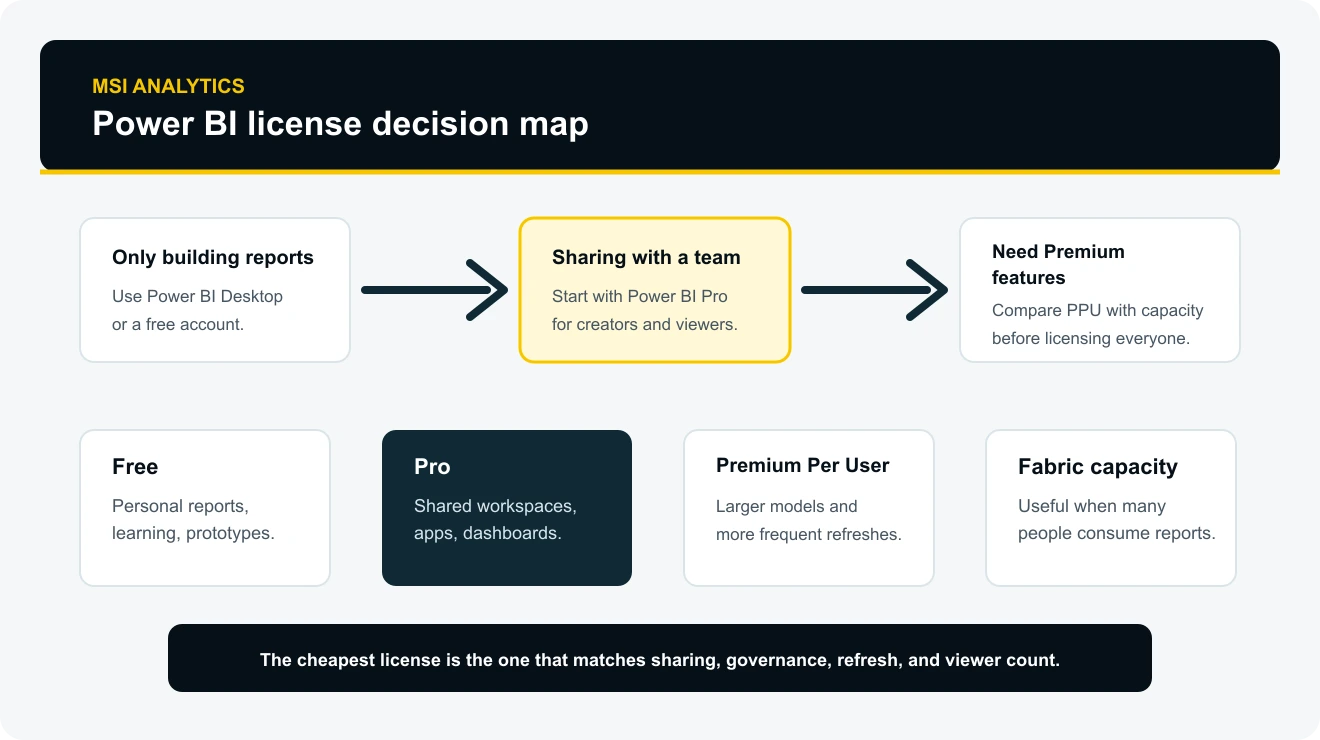
What a Pro licence includes
A Power BI Pro licence is mainly about collaboration in the Power BI service. Power BI Desktop is free for building reports locally, but Pro is the common licence once a team needs shared workspaces, report apps, dashboards, subscriptions, and controlled access.
Microsoft describes Power BI Pro as a per-user licence that lets users create, read, and interact with content published to the Power BI service. Pro users can share and collaborate with other Pro users in standard shared capacity. If content is hosted in Premium capacity, Pro users can also collaborate with free and Premium Per User users depending on the workspace and access model.
| Need | What Pro usually enables | What to check before buying |
|---|---|---|
| Publish reports | Publish content to shared workspaces and distribute reports through the Power BI service. | Who owns the workspace, who can update reports, and how deployment will be governed. |
| Share dashboards and apps | Share dashboards, reports, and apps with other licensed users in the organisation. | Whether viewers also need Pro, PPU, or can view through a qualifying Premium or Fabric capacity. |
| Refresh scheduled datasets | Use scheduled refresh for standard reporting models in the Power BI service. | Refresh frequency, gateway setup, data-source credentials, and model size. |
| Collaborate in workspaces | Work with other creators and analysts in app workspaces. | Workspace roles, approval rules, and whether development and production should be separated. |
Microsoft’s plan comparison lists useful service limits as well. Pro includes a 1 GB model memory size limit, 8 refreshes per day for Power BI datasets, and 10 GB of native Power BI storage per licence. Premium Per User raises several of those limits, including larger model support and more frequent refreshes.
Power BI Free vs Pro
Power BI Free is enough when the work is personal. You can learn Power BI, build reports in Power BI Desktop, connect to data, model tables, write DAX measures, and create useful visuals without a paid Pro licence.
The problem appears when the report needs to leave one person’s private workspace. Free users cannot use the normal Power BI sharing and collaboration features with other people unless the content is in a qualifying Premium or Fabric capacity scenario. In most small and mid-sized teams, that means every regular creator and viewer of shared Pro-workspace content needs Pro.
| Situation | Free is usually enough | Pro is usually needed |
|---|---|---|
| Learning Power BI | Yes, especially with Power BI Desktop and practice files. | No, unless the learner must publish and share reports. |
| One analyst building local reports | Yes, if the file stays local or private. | Yes, once the report is published for other people. |
| Manager viewing a shared report | Only in eligible Premium or Fabric capacity scenarios. | Usually yes for shared Pro workspaces. |
| Departmental reporting | No, not for normal shared collaboration. | Yes, for creators and most viewers in standard workspaces. |
When Fabric capacity changes the calculation
Fabric capacity changes Power BI licensing because it moves part of the decision from individual users to a shared compute resource. Microsoft Learn explains that F64 or larger Fabric capacity can allow users with a free licence and viewer role to view Power BI content in that capacity. Smaller F SKUs still require each consuming user to have Pro, Premium Per User, or an individual trial for Power BI content.
This is where many teams make the wrong comparison. They compare Pro against Premium Per User without counting viewers, report creators, workspace roles, model size, refresh needs, data estate plans, and whether the business is also adopting Fabric workloads such as lakehouses, warehouses, pipelines, notebooks, or real-time analytics.
For a small team of report builders and regular managers, Pro is often the cleanest starting point. For a large organisation with many read-only viewers, a capacity model may make more sense, but it needs governance. Capacity does not remove the need for clear workspace roles, data ownership, refresh monitoring, security reviews, and lifecycle management. That same licensing choice often sits behind wider reporting builds such as financial dashboards in Power BI, where viewer count and refresh expectations affect the final setup.
Microsoft 365 E5 and Office 365 E5 inclusion
Microsoft’s pricing page states that Power BI Pro is included in Microsoft 365 E5 and Office 365 E5. This matters because some organisations already pay for Pro through broader Microsoft licensing, while others buy it as a standalone subscription.
Before purchasing separate Pro licences, check whether the users already have an eligible E5 licence assigned. Also check tenant settings for self-service purchase and self-service sign-up. Microsoft Learn notes that administrators may control whether users can buy or sign up individually, and some organisations prefer all licences to be approved through a central procurement process.
Common licensing scenarios
| Scenario | Likely starting point | Why |
|---|---|---|
| One person learning Power BI | Free account and Power BI Desktop | The work is private, and the goal is learning or prototype creation. |
| Small team sharing sales or finance reports | Power BI Pro for creators and viewers | Shared workspaces and report access are the main requirement. |
| Analytics team needs larger models and frequent refresh | Premium Per User for the whole participant group | The team needs Premium features without a full capacity purchase. |
| Large audience of report viewers | Fabric capacity assessment | Per-user licensing can become inefficient when many people only view governed content. |
| Customer-facing embedded analytics | Power BI Embedded or Fabric capacity review | External embedding has different licensing and application architecture requirements. |
Cost mistakes to avoid
Counting report creators but not viewers
Power BI cost planning often starts with the analysts who build dashboards. The bill usually changes when managers, department heads, regional users, finance reviewers, external partners, or executives also need access.
Assuming Desktop means shared reporting is free
Power BI Desktop is free and powerful, but it does not replace Power BI service licensing for normal publishing, sharing, workspace collaboration, and governed access.
Buying Premium Per User for one creator only
Premium Per User features can be useful, but a PPU workspace is not a loophole for sharing Premium content with ordinary Pro viewers. Check who needs access before upgrading a single creator.
Ignoring refresh and model limits
A Pro model that refreshes a few times a day may be fine. A large operational model with heavy transformations, large semantic models, or frequent refresh needs may need a different architecture.
Forgetting administration and ownership
Licences do not create governance. Someone still needs to own workspaces, row-level security, gateway credentials, naming conventions, deployment rules, usage monitoring, and access reviews.
How to choose the right Power BI licence
Start with the reporting workflow, not the licence table. Write down who builds reports, who approves them, who views them, where the content lives, how often it refreshes, and what happens when the main report owner leaves. It also helps to review the sort of reporting experience you actually want to publish, whether that is a management pack, a KPI dashboard, or one of the dashboards in the MSI Analytics showcase.
- Use Free or Desktop when the work is personal, exploratory, or educational.
- Use Pro when a team needs shared dashboards, apps, workspaces, and standard collaboration.
- Use Premium Per User when every participant can be licensed with PPU and the team needs Premium features.
- Assess Fabric capacity when many users only need to consume governed reports or the business is adopting Fabric beyond Power BI.
- Review Embedded when analytics are part of a customer-facing application rather than an internal report portal.
Frequently asked questions
How much does Power BI Pro cost
Microsoft lists Power BI Pro at $14.00 per user per month, paid yearly. Check Microsoft or your reseller before purchase because final prices can vary by country, currency, agreement, and checkout path.
Do viewers need a Power BI Pro licence
In a normal Pro workspace, viewers usually need Pro as well. Free users can view shared content in eligible Premium or Fabric capacity scenarios, but that depends on the workspace, capacity size, and user role.
Is Power BI Pro included in Microsoft 365
Power BI Pro is included in Microsoft 365 E5 and Office 365 E5 according to Microsoft’s pricing page. It is not included in every Microsoft 365 plan, so administrators should check assigned licences before buying standalone Pro seats.
What is the difference between Power BI Pro and Premium Per User
Pro covers standard publishing, sharing, and collaboration. Premium Per User includes Pro capabilities plus most Premium features, but PPU workspaces generally require other participants to have PPU as well.
Should a small business buy Power BI Pro
A small business should buy Pro when more than one person needs to view, share, subscribe to, or collaborate on published Power BI reports. If one person is only learning or building private reports, Free and Desktop may be enough.
Sources and further reading: Microsoft Power BI pricing; Microsoft Power BI Pro; Power BI service features by licence type; Microsoft Fabric licensing and capacity; Power BI licensing guide for organisations.